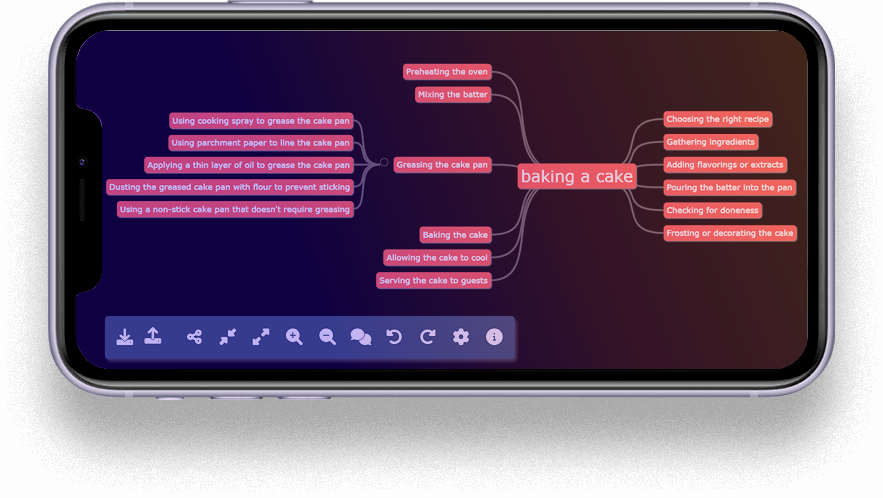
Join the future of brainstorming with MyndFlow and experience the thrill of collaboration, the depth of AI-driven insights, and the boundless potential of your ideas coming to life in a visually captivating mindmap. Start elevating your brainstorming journey today.
GPT + HUMAN COLLABORATION
About MyndFlow
Unleash the power of collaboration between human creativity and the precision of AI with MyndFlow. Our innovative mindmap tool leverages the OpenAI ChatGPT API to bring you a unique brainstorming experience. Create comprehensive mindmaps that capture your ideas, plans, and visions in a visually engaging and organized format.
LIMITLESS BRAINSTORMS
Features
01
🧠 Seamless Collaboration
MyndFlow seamlessly integrates ChatGPT’s capabilities into the mindmapping process. Collaborate with the AI to generate insightful suggestions, structure your ideas, and explore new angles.
02
🔗 Interactive Brainstorming
Go beyond mere suggestions. Engage in dynamic conversations with ChatGPT to dive deep into your mindmap topics. Share your thoughts, ask probing questions, and explore ideas from multiple angles.
03
🌟 Two-Way Exploration
MyndFlow fosters a back-and-forth exchange. Pose questions to ChatGPT about your mindmap and invite it to ask you questions in return. This interactive dialogue enhances your brainstorming process.
04
🚀 Boost Creativity
By harnessing the synergy of human ingenuity and AI’s vast knowledge, MyndFlow helps you unlock new dimensions of creativity. Your mindmaps will reflect a harmonious fusion of innovative thinking.
05
🌐 Global Insight
With MyndFlow, you’re not limited to your perspective alone. Engage with ChatGPT to gain insights and perspectives from a global array of information, enriching your mindmaps.
06
💬 Tech Support
MyndFlow offers techinical support for uninterrupted creative journeys. Get instant solutions, troubleshoot issues, and optimize mindmaps with our live chat feature ensuring real-time assistance for an enhanced experience.
Unlock Infinite Creativity
Usage
A Fusion of Human Brilliance and GPT-Powered
Mind Mapping for Ultimate Brainstorms
Mind mapping serves a multitude of purposes, including fostering brainstorming sessions, tackling problems, nurturing creativity, efficiently managing information, aiding learning, and reinforcing knowledge retention. These visual diagrams facilitate the interlinking of ideas, the recognition of connections and patterns, and the formation of a holistic comprehension of a subject. Embraced by diverse sectors like business, education, government, charities, and households, mind mapping stands as a versatile tool in the pursuit of enhanced understanding and innovation.
” MyndFlow has revolutionized the way I brainstorm and strategize marketing campaigns. The seamless collaboration with ChatGPT brings fresh insights to the table, making my ideas more comprehensive and dynamic. It’s like having a brainstorming partner available 24/7! ”
” MyndFlow isn’t just another app; it’s my creative companion. From study sessions to personal projects, it’s a mind-mapping powerhouse that helps me tame my scattered thoughts. ChatGPT feels like an AI sidekick, helping me craft mind-bending ideas that I wouldn’t have thought of on my own. ”
” From planning home projects to decluttering tasks, MyndFlow has simplified my life. It’s like having a virtual assistant that assists me in structuring ideas, setting priorities, and turning them into actionable plans. Now my home projects are efficient and organized. ”
” Running a business, I often encounter complex challenges which i have to surmount. MyndFlow became my secret weapon for problem-solving because the AI-powered interactions stimulate fresh approaches, and the mindmaps provide a clear roadmap for overcoming obstacles. ”
” MyndFlow has completely revolutionized my teaching approach. It’s as if my classroom has evolved into a vibrant hub of collaborative learning. Engaging with ChatGPT during brainstorming sessions has elevated my students’ critical thinking and turned our discussions into a symphony of ideas. Teaching with it has redefined vibrancy in education. “
Lorem ipsum dolor sit amet, consectetur adipisicing elit, sed do eiusmod tempor incididunt ut labore et dolore magna aliqua. Ut enim ad minim veniam, quis nostrud.
Lorem ipsum dolor sit amet, consectetur adipisicing elit, sed do eiusmod tempor incididunt ut labore et dolore magna aliqua. Ut enim ad minim veniam, quis nostrud exercitation ullamco.
New Possibilities
Features
01
High Security
Proin gravida nibh vel velit auctor aliquet. Aenean sollicitudin, lorem quis bibendum auctor, nisi elit consequat ipsum, nec sagittis sem.
02
Fast Performance
Proin gravida nibh vel velit auctor aliquet. Aenean sollicitudin, lorem quis bibendum auctor.
03
Free Updates
Proin gravida nibh vel velit auctor aliquet. Aenean sollicitudin, lorem quis bibendum auctor, nisi elit consequat ipsum, nec sagittis sem. Lorem quis bibendum auctor, nisi elit.
04
24/7 Support
Proin gravida nibh vel velit auctor aliquet. Aenean sollicitudin, lorem quis bibendum auctor, nisi elit consequat ipsum, nec sagittis sem. Lorem quis bibendum auctor, nisi elit.
05
Awesome Widgets
Proin gravida nibh vel velit auctor aliquet. Aenean sollicitudin, lorem quis bibendum auctor, nisi elit consequat ipsum, nec sagittis sem.
06
Smooth Integration
Proin gravida nibh vel velit auctor aliquet. Aenean sollicitudin, lorem quis bibendum auctor.
Integration
Lorem ipsum dolor sit amet, consectetur adipiscing elit. Ut elit tellus, luctus nec ullamcorper mattis, pulvinar dapibus leo.
” Urna eu felis dapibus condimentum sit amet a augue. Sed non neque elit. Sed ut imperdiet nisi. Proin condimentum nullam ac eu felis dapibus condimentum sit amet a augue. Sed non neque elit. Sed ut imperdiet nisi. Proin condimentum sit voluptatem. “
” Nullam ac urna eu felis dapibus condimentum sit amet a augue. Sed non neque elit. Sed ut imperdiet nisi. Proin condimentum Dapibus condimentum sit amet a augue. Sed non neque elit. Sed ut imperdiet nisi. “
MyndFlow is an innovative ChatGPT + Human Collaboration Mindmap Tool that leverages the OpenAI ChatGPT API to provide a unique brainstorming experience.
You can create comprehensive mindmaps that capture your ideas, plans, and visions in a visually engaging and organized format.
MyndFlow combines the precision of AI-driven insights with the creativity of human collaboration to bring your ideas to life in an interactive and visually captivating way.
How can I get started with MyndFlow?
Getting started with MyndFlow is easy – simply sign up for a subscription on our website, and you’ll gain access to our powerful ChatGPT + Human Collaboration Mindmap Tool.
Our pricing plans are flexible and affordable, so you can choose the subscription that best suits your needs and budget.
Once you’re signed up, you can start using MyndFlow right away to explore new ideas, collaborate with others, and organize your plans and visions in a visually captivating way.
Is MyndFlow secure?
Yes, we take your privacy and security very seriously at MyndFlow. The security of your OpenAI API key is important. Efforts have been made with this app to ensure its safety.
Our tool is designed to be secure and easy to use, with robust encryption and other security features to ensure your data stays safe and protected. Your API key is not stored locally in any persistent storage and must be entered each time you load this page.
We also offer a range of privacy settings and controls to help you manage your data and keep it secure at all times.
This app is fairly lightweight in its usage, but make sure you have a spending limit on your OpenAI account. You can see token count usage in the settings page.
Note that maps are autosaved via the IndexedDB API, browser-based storage that is only accessible by the same origin. In other words, your maps can only be accessed from where this page is being served from. Be careful when using other browser-based applications you save/serve from the same location, as they can access the IndexDB API storage. Use only code that is openly reviewable, open source, or from a trusted entity.
What are the benefits of using MyndFlow?
MyndFlow offers numerous benefits, including the ability to collaborate with AI, access to AI-powered insights that can help you unlock new ideas and perspectives, and the ability to create visually stunning and organized mindmaps that capture your ideas and plans in a dynamic way.
Our tool is perfect for brainstorming, project planning, and ideation sessions with teams or individuals.
Token Use
You would need a Token from OpenAI in order to use the MyndFlow tool. You cna get a free key when you sign up here - https://openai.com/
Tokens are the basic unit that OpenAI GPT models (including ChatGPT) use to compute the length of a text. Tokens can be thought of as pieces of words. Before the API processes the prompts, the input is broken down into tokens.
Token usage is relatively light and you can find a total usage count via settings (gear) icon.
Quick Tutorial
SECURITY:
The security of your OpenAI API key is important. Efforts have been made with this app to ensure its safety.
Your API key is not stored locally in any persistent storage and must be entered each time you load this page.
This app is fairly lightweight in its usage, but make sure you have a spending limit on your OpenAI account. You can see token count usage in the settings page.
THE NAVIGATION / MENU:
Mouse click to select a node, double-click to edit, press Enter to save
You can either click and drag your mouse to pan the mindmap, or use mousewheel / two-finger guestures on touchpad to scroll the mindmap vertically or horizontally if it's larger in those dimensions (respectively) to the screen.
Mouse drag nodes to move to another node
Mouse click small circle to expand/collapse
Press Enter to create a sibling node
Press Ctrl-Enter to create a child node
Press Delete to delete a node
Note that maps are autosaved via the IndexedDB API, browser-based storage that is only accessible by the same origin. In other words, your maps can only be accessed from where this page is being served from. Be careful when using other browser-based applications you save/serve from the same location, as they can access the IndexDB API storage. Use only code that is openly reviewable, open source, or from a trusted entity.
BUTTON BAR:
- Make a backup of the map. As mentioned above, the map is already stored in your browser, but this can be used for transferring between computers.
- Load a backup of the map. The map must be empty to ensure you don't accidentally overwrite another map.
- Get suggestions from GPT-3.5, which is what this is all about! You can configure how this is done in settings.
- Collapse all
- Expand all
- Zoom in
- Zoom out
- Engage in a deeper discussion with GPT-3.5 about a particular node. The first time you chat about a node both the mindmap and a series of questions will be sent to GPT API. Subsequently, all messages will be prefixed with the mindmap only. You can configure these prompts in settings.
- Undo, may have to click twice. This is a bit hard to use right now, working on it.
- Redo, may have to click twice
- Settings. You can change the prompts used to get suggestions and discuss nodes. Make sure you review them carefully before making changes. Backing up a copy of the prompt for reverting is probably a good idea.
TOKENS:
Token usage is relatively light and you can find a total usage count via settings (gear) icon.
Welcome to our Mind Mapping 101 tutorial, where we'll guide you through the basics of mind mapping using the MyndFlow tool. Mind mapping is a powerful technique to visually organize your thoughts, ideas, and concepts. MyndFlow makes this process even easier and more efficient. Let's dive in!
Step 1: Sign Up or Log In to MyndFlow
If you haven't already, sign up for a MyndFlow account or log in if you're an existing user. This will give you access to the tool's features and functionalities.
Step 2: Create a New Mind Map
Click on the "New Mind Map" button to start a new project. Give your mind map a title that reflects the main topic you'll be exploring.
Step 3: Add Central Idea
In the center of your canvas, add your central idea or main topic. This will serve as the focal point of your mind map.
Step 4: Branch Out with Subtopics
From the central idea, create branches that represent subtopics related to your main idea. Click on the central idea, and then click on the "Add Branch" button to create your first subtopic.
Step 5: Explore Further Subtopics
For each subtopic, continue branching out by adding more related subtopics. You can do this by clicking on a subtopic and clicking "Add Branch" again.
Step 6: Add Descriptive Elements
Enhance your mind map by adding descriptive elements. Click on a subtopic and use icons, images, colors, and notes to make it visually engaging and informative.
Step 7: Connect and Organize
Use arrows and connectors to show relationships between different subtopics. This helps organize your ideas and show how they are connected.
Step 8: Collaborate and Share
MyndFlow allows collaboration in real-time. Click on the "Share" button to invite others to collaborate on your mind map. They can add their insights, making it a great tool for teamwork and brainstorming.
Step 9: Save and Export
Once you've completed your mind map, don't forget to save your progress. You can also export your mind map as an image, PDF, or other compatible formats.
Step 10: Review and Refine
Take a moment to review your mind map. Is it clear and organized? Use MyndFlow's editing tools to refine your mind map until it accurately represents your thoughts.
Congratulations! You've just completed your first mind map using MyndFlow. Mind mapping is a versatile technique that can be applied to various projects, from studying to project planning. Feel free to experiment with different layouts, colors, and styles to find what works best for you.
Now that you're familiar with the basics, go ahead and explore MyndFlow further to unlock its full potential in enhancing your organization, creativity, and idea development. Happy mind mapping!
The Button Bar
BUTTON BAR:
- Make a backup of the map. As mentioned above, the map is already stored in your browser, but this can be used for transferring between computers.
- Load a backup of the map. The map must be empty to ensure you don't accidentally overwrite another map.
- Get suggestions from GPT-3.5, which is what this is all about! You can configure how this is done in settings.
- Collapse all
- Expand all
- Zoom in
- Zoom out
- Engage in a deeper discussion with GPT-3.5 about a particular node. The first time you chat about a node both the mindmap and a series of questions will be sent to GPT API. Subsequently, all messages will be prefixed with the mindmap only. You can configure these prompts in settings.
- Undo, may have to click twice. This is a bit hard to use right now, working on it.
- Redo, may have to click twice
- Settings. You can change the prompts used to get suggestions and discuss nodes. Make sure you review them carefully before making changes. Backing up a copy of the prompt for reverting is probably a good idea.